
You choose two things when you set a Loyalty Program up: how many stamps it takes, and what the customer gets. Everything else follows from those.
One stamp at a time
A stamp goes on when you scan the customer’s card and tap Award stamp. That is the only way a stamp is ever given at the counter: nothing happens on a schedule, or because somebody visited without being scanned. There are two exceptions, both below, and both are stamps your Program hands out itself rather than stamps anybody presses a button for: the free stamp for joining, and the free stamp on a customer’s birthday.
A free stamp for joining
The Offer tab has a switch under Enrolment stamp, Give a free stamp upon enrolment. Turn it on and anybody who joins that Loyalty Program is handed a card that already holds its first stamp, so on a nine-stamp card it reads 1 of 9 rather than empty the moment they open it. It is a warm start, and it saves the awkward first card that looks like nothing has happened yet.
It is given once, as they join, and only on the Program you turned it on for. Your other Programs are unaffected, customers who joined before you turned it on are not given one, and nobody can collect it twice by signing up again, because a second sign-up simply finds the card they already have. Turn it off and new customers start from empty again, while stamps already given stay where they are.
It is an ordinary stamp once it is on the card. It counts towards the reward like any other, so on a nine-stamp card somebody who joins this way needs eight more visits, and it appears in your Audit Log under Reports, labelled as a joining stamp.
A free stamp on their birthday
Birthdays are set up per Loyalty Program, on that Program’s Notifications tab, under Birthdays. Open the Program from Loyalty Programs and the tab is in the row across the top. Choose A free stamp on their card and every customer who gave you a date of birth gets one when the day comes round. It needs the date: turn on "Date of birth" under Data collection on the Offer tab first, because a Program that does not ask for a birthday has none to act on.
It goes on at about 8am on the day, UK time, on its own, and their wallet card carries it from then, which is the point: it brings somebody through the door on their birthday instead of quietly topping up a card they were not thinking about. If anything stops that, it goes on the next time you scan their card instead. LoyalPack App shows the new count as soon as it reads the card, so you can say happy birthday while it is on the screen, and it is never given twice whichever way round it happened.
- Once a year, per customer. The morning run adds nothing on top of a stamp already given, a second scan the same day adds nothing, a second till adds nothing, and they get one again next year without you doing anything.
- Only customers who gave you a birthday. Anybody who joined before you switched the question on was never asked, so they have no date on file and nothing to give a stamp on. There is no way to fill that in later.
- A full card waits. If their card is already complete when you scan it, the birthday stamp is not added on top: a full card is the moment to ask Spend reward or Not this time, and a stamp appearing underneath that question would answer it for them. Settle the reward and scan again, on the same day, and the stamp goes on.
- It is their birthday or it is not. There is no catching up on a birthday that has passed, and no way to award one by hand.
It is an ordinary stamp too. It counts towards the reward, it moves the card in their wallet like any other, and it shows in your Audit Log under Reports labelled as a birthday stamp, so you can tell it from one your staff gave at the counter.
A free reward on their birthday
The same setting offers A free reward, ready to use instead. That is a whole reward rather than one stamp, and it sits beside whatever the customer is collecting: their stamp count does not move, so they keep working towards the next card while this one is waiting to be handed over. Spend it exactly as you would any other. It follows the same rules as the stamp above: on the morning of the day, once a year, and only where you ask for a date of birth.
It shows in your Audit Log as a birthday reward, by System, so a reward nobody earned at the counter is never a mystery. Full details, including the birthday message you can send with it, are in Birthday rewards and messages.
When the card is full
When the count reaches the number you set, the reward is due. LoyalPack App says so as soon as it reads the card, and the buttons change: Spend reward, with Not this time beside it.
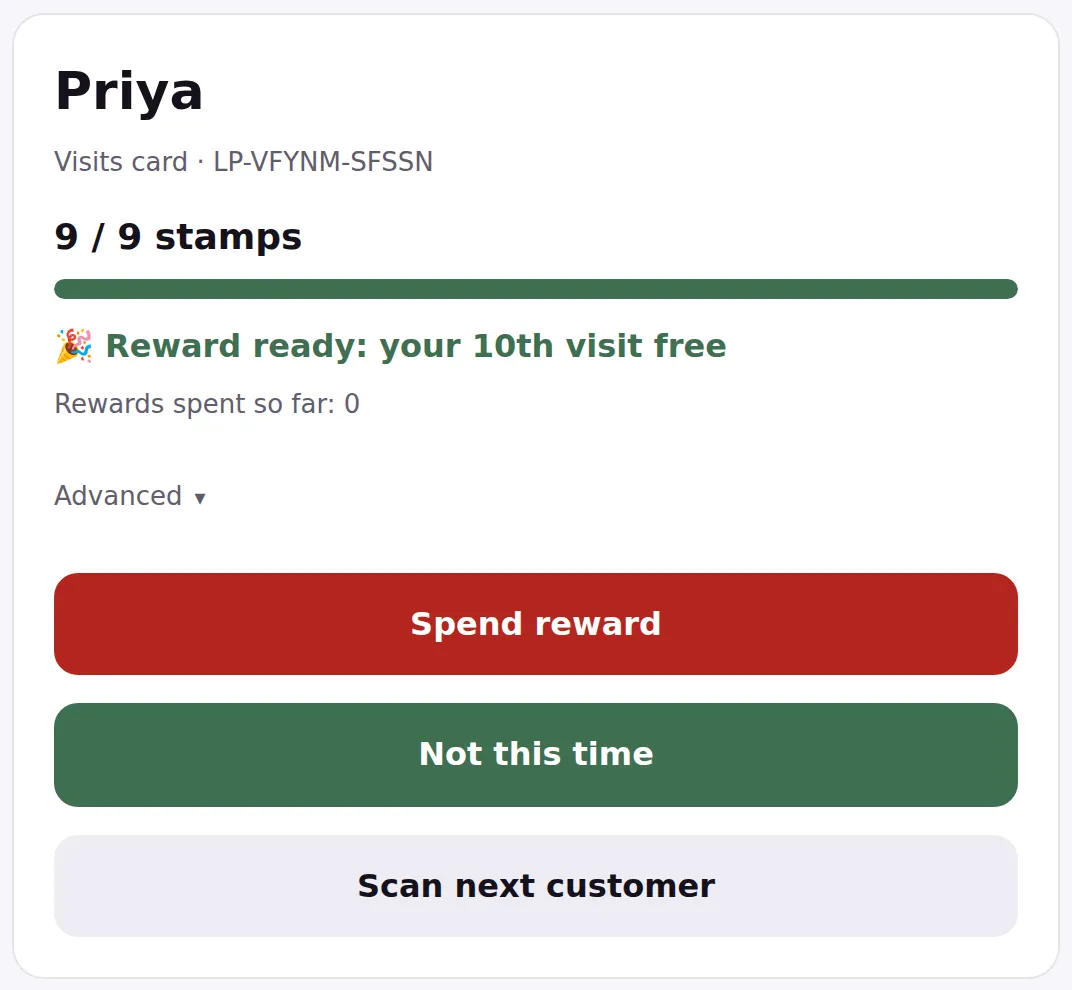
A full card will not take another stamp on its own. That is deliberate: it makes you and the customer decide out loud what happens next, rather than a tap quietly using up a reward. You get two buttons instead of one, Spend reward and Not this time, and either of them is a whole answer.
Not this time is for the customer who is buying something anyway and would rather keep the reward for another day. Tap it and both things are true: the reward is saved for them, and the purchase they are paying for right now is stamped. Every scan after that tells you they have one waiting, until they claim it. There is a guide to it below.
A larger purchase can carry somebody past the end of their card in one go, and nothing is lost when it does. Use Advanced to set how many stamps it is worth: the reward they reach is saved for them, and the stamps beyond it start their new card.
If you change the number later
You can change it on the Offer tab at any time, and the change applies to every card at once, including cards already part way along. Lowering it can therefore make somebody’s card full immediately, which is a nice surprise for them and worth expecting at the counter.
Nobody loses progress when you change the offer. Stamps already collected stay collected.